When we read through the negative reviews of shipping calculator apps, the complaint that came back most often was not that the rates were wrong. It was that the store got slower. So when we added a shipping estimate to the cart page of our own cart app, the first thing we wrote down was not the design. It was the size budget.
The budget was wrong, in a way that would never have announced itself. Here is how, and the two other numbers we found while fixing it.
A budget that was already true on day one
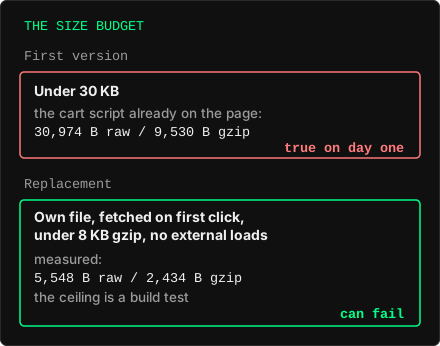
The first version said: under 30 KB. That sounds strict until you measure what is already on the page. Our existing cart script is 30,974 bytes raw and 9,530 compressed, and the platform's own guidance suggests keeping a theme app extension script under 10 KB compressed. The budget was satisfied before a single line of the new feature existed, and it would have stayed satisfied while the cart page got slower.
A ceiling that the current state already meets is not a budget. It is a description of the past. The replacement names the mechanism, not just the number:
- its own file, not appended to the main cart script
- fetched on the first click, not on every cart view
- under 8 KB compressed
- no external loads
Measured, the built widget is 5,548 bytes raw and 2,434 compressed. The 8 KB is not a limit we inherited from anyone; it is this feature's own argument for existing as a separate file. If the calculator ever needs more than that, it has stopped being the small thing that earned the right to be loaded on demand.
The ceiling also lives in a build test, not in anyone's review habits. A number that only exists in a plan is checked by whoever remembers it.
The part that cannot be loaded later
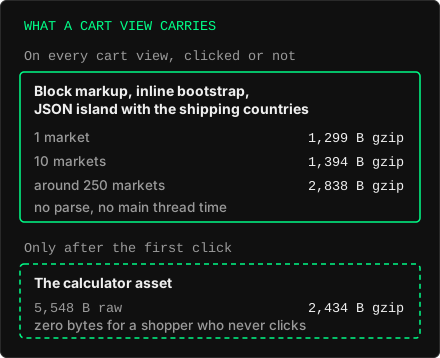
Zero bytes until a click is the easy half. What every cart view carries, whether or not the shopper ever looks at shipping, is the block's markup, a short inline bootstrap, and a JSON island holding the data the widget needs in order to start: the countries the store ships to.
That last part means there is no single number. It follows the merchant's own configuration:
- a store shipping to 1 country: 1,299 bytes compressed on every cart view
- a store shipping to 10: 1,394 bytes
- a store shipping to around 250, which is what "ships everywhere" looks like in the data: 2,838 bytes
The island is a script element of type application/json, so the browser downloads it and does nothing else with it: no parsing, no execution, no main thread time, even in the ships-everywhere case. That is why we were willing to put the data on the page instead of fetching it on demand. It is also why the honest figure to publish is three numbers rather than one, and why the one we would have quoted, the 2,434 bytes nobody downloads unless they click, is the least interesting of them.
More calls, because the single call is throttled
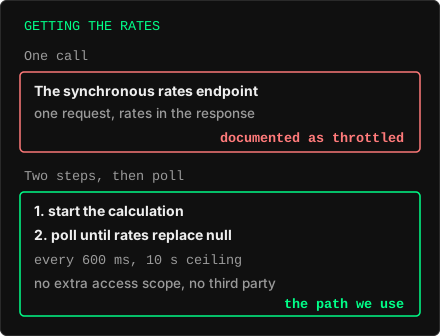
Shopify's storefront cart API has a synchronous endpoint that returns shipping rates in one request, and the documentation says it is throttled. The asynchronous pair is two steps instead: one request starts the calculation, then a poll returns rates once they are ready and null until then. We poll every 600 ms and give up after 10 seconds.
So the fast path is the one with more round trips. It is also the cheap path in every other sense. It needs no extra access permission, it pulls in no third party script, and the postcode the shopper types goes to the shop's own domain and stays in the browser otherwise.
One limit belongs in the same paragraph as the feature rather than in a footnote: these endpoints exist only on themes hosted by Shopify. On a custom storefront they are not there at all. When the widget gets a 404, or a theme that answers the path with its own HTML error page, it takes itself off the cart entirely. A shopper is better served by the theme's plain cart than by a form that can never answer.
Who decides where it appears
There were two ways to get the widget onto a cart page. Either the merchant drags a block into the cart template in the theme editor, or the app injects it into the theme's own cart markup from a script that is already loaded.
The second is one setup step fewer, and it is also exactly the failure class the category's negative reviews are made of: an app guessing where a theme puts things, and guessing wrong on the theme you happen to run. So the block went first. The injected variant exists as a design constraint rather than as a promise: the widget's core draws into the element it is handed and never searches the page for cart markup, so a container made some other way can call the same function without a rebuild. When it ships it will be a switch that starts off, together with the list of themes it was tested on. We are not putting a date on it.
The rule
A performance budget is a test, or it is a wish. Ours was a sentence in a plan, it was already true on the day it was written, and nothing in our process would have told us. What we do now, in our setup:
- A budget names the mechanism, not just the ceiling. "Under 8 KB, own file, fetched on use" can fail. "Under 30 KB" could not.
- Before agreeing a ceiling, measure what the current state weighs. If the current state passes, the ceiling is not a constraint.
- Publish the cost to someone who never uses the feature. The lazy loaded asset is the flattering number. The always present bytes are the ones actually paid, and they move with the merchant's configuration, so there is more than one of them.
Back to the complaint we started from, that the store got slower. We cannot measure that for every store, but we can say what this block adds to it. A shopper who never opens the estimate gets between 1,299 and 2,838 bytes compressed on every cart view, depending on how many countries the shop ships to, and the largest part of that, the country list, is never parsed or run. The calculator itself, 2,434 bytes, arrives only for the shopper who asks for it. The second number is the one we would have quoted. The first is the one that answers the reviews.