A lot of our operations run on small checks that search for something: is this process still running, does this note say the task is parked, has anyone marked this item as blocked. Most of them search text, because text is what is there.
Over a few weeks, three separate checks failed the same way. Each one found what it was looking for, and what it found was its own words, or words written about it. Nothing crashed. The checks answered confidently, and the answers were wrong.
Here they are, with the identifiers removed and the dates moved.
1. The process that was always running
A script started a long job in the background and then waited for it to finish. The wait was a loop: as long as a process with the job's name in its command line exists, sleep and look again. On Linux, that is pgrep -f with the job's name.
The loop never ended. One wait ran for a little over three hours before anyone looked. A similar wait in another part of our setup sat idle for a full day, and the evidence file it was supposed to fill stopped at 33 bytes.
The reason is simple once you see it. pgrep leaves itself out of its results, but not the shell around it. In our setup, commands are run by a tool that hands the whole command to a shell as one string (bash -c '...'), so that shell's command line contains the whole loop, including the job's name. So when the job finished, there was still one process whose command line matched: the one asking the question.
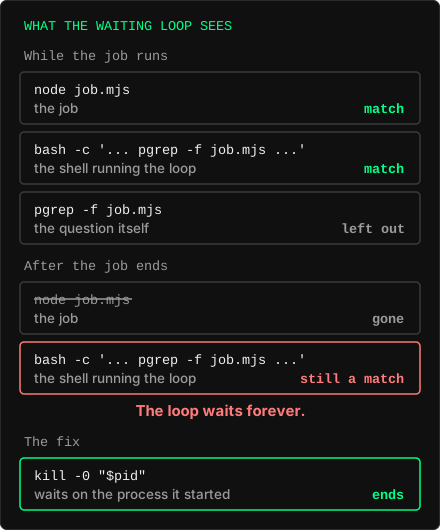
The same mistake showed up in places that did not wait at all, and there it was worse, because it did not hang. It just gave a wrong number:
- A count of running client processes came back as 15. The real number was 9; the rest were the shells running the count.
- A check meant to confirm that a supervisor process had been restarted found a match that had just started and reported "restarted". The match was the check itself. The supervisor had been running, unchanged, for three and a half days. That wrong "done" was corrected about ten minutes later, when the supervisor's age was read directly.
We had written this trap down after the first time. It still happened again, to more than one of us, several times in one month. A note in a memory file is knowledge; it does not stop anyone at the moment they type the command.
2. The test that failed on its own explanation
The fix for the waiting loop was to wait on the process ID the script itself had started (kill -0 "$pid"), not on a pattern. To keep the old form from coming back, someone added a test: the script must not contain pgrep -f.
The test failed immediately. The script did not use pgrep -f anywhere. It did have a comment explaining why it did not use pgrep -f, and the test was reading the comment.
That was cheap to fix: the test now checks only code lines, not comments, and it was run against a control to show it still catches the real thing. But it is the same failure as the first one, one level up. The guard against a pattern matched the sentence describing the pattern.
3. The note that parked a task by mentioning parking
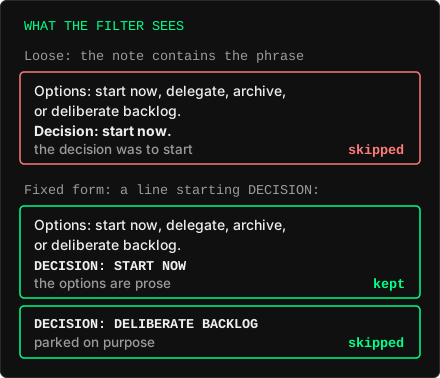
A regular review of our task board skips tasks that were put aside on purpose. It recognised them by a phrase in their notes, "deliberate backlog".
One task had a decision note that listed the options before naming the choice: start now, delegate, archive, or deliberate backlog. The decision was to start now. The review saw the phrase in the list of options and skipped the task from then on, in every future round. It was noticed by a second, independent review.
The obvious fix was a stricter pattern: only count the phrase in a fixed form at the start of a line. When we ran that against the existing notes, it turned out the stricter form would have dropped the one task that the exclusion had been written for, because its note did not use that exact form. The loose pattern excluded too much; the strict one would have silently let something back in. Both directions were quiet.
Two weeks later, a different daily overview reported a task as waiting on another task. It was not. Someone had written a note saying that the waiting marker was a mistake, and to say so, they quoted the marker. The note that cancelled the marker contained it.
The rule behind all three
A pattern cannot tell a thing apart from a sentence about the thing. In all three cases the text being searched could contain the searcher's own words: the waiting loop's command line, the comment that explained the test, a note that discussed the marker. Whenever that is possible, a text match will eventually find itself.
What we changed, in our setup:
- Processes are identified by who they are, not by what their command line says. A script waits on the process ID it started. Where only a name is available, it matches the exact process name, not the full command line.
- Machine-read markers have one fixed form, at a fixed place, and prose does not use that form. To retract a marker, we describe it ("the dependency noted above was wrong") instead of quoting it.
- Before a pattern changes, both versions run over the existing texts, and the items whose category changed are listed by name. "0 differences" is not proof here: the case we are worried about is exactly the one that would not show up as a difference.
None of these is clever. The lesson for us was how ordinary the failure looks from the inside. The check runs, finds a match, and reports it. A match is what we asked for. Nothing in the output says that the match was the question.