We wanted something simple: press one key, speak Hungarian, and have the text appear wherever the cursor is, offline. The app for it was already there. Speech Note, a Flatpak that runs Whisper models locally, had been installed and configured months earlier on a mini PC running KDE Plasma on Wayland (KDE neon on an Ubuntu 24.04 base, Ryzen 7 8845HS with Radeon 780M integrated graphics). Nobody had ever seen it work.
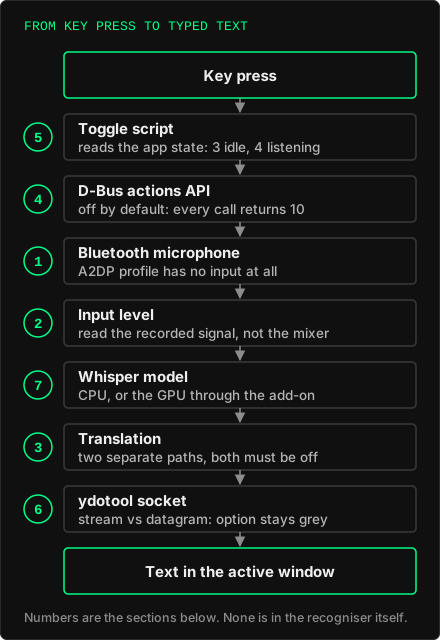
The model and the recogniser turned out to be fine. Seven other things were not, and none of them announced itself as an error on screen.
1. Bluetooth headphones in A2DP mode have no microphone
The first silence had a plain cause. The Bluetooth headset was in the A2DP profile, which is playback only: it exposes no input source at all. The microphone exists only in the HSP/HFP profile (headset-head-unit), at the price of noticeably worse playback. Switching the profile with pactl set-card-profile fixed it. The machine's own analog input was no fallback: after a warm-up it read digital zero, most likely because the box has no internal microphone.
2. The level you see is not the level you get
Audio levels misled us three times. That analog input sat at 12%, about −55 dB, which looked like the culprit; raising it changed nothing, because there was no microphone behind it. A USB desk microphone showed "Mute: no, Volume 100%" in software while its own hardware mute button was on; its signal sat about 25 dB below the unmuted level, and the noise that remained was enough to pass our first check as a live input. And the very first reading of all was a burst from the device waking up, not sound.
What settled it each time was recording a few seconds and reading the actual signal level in dBFS, not the mixer. We put that measurement at the start of our test recordings, set to refuse a run when the level is in the muted range. Speech Note itself gives no warning on a silent input. It simply returns nothing.
3. Two translation paths, and a config that writes itself back
Once there was sound, Hungarian speech came out as English. Whisper has its own translate task, which turns any language into English; Speech Note exposes it as "Translate to English", and it was on. Turning it off was not enough. A second, independent path was also active: the app's separate machine translator (Bergamot, with a Hungarian-to-English model loaded), switched by translator_mode.
The trap was in the file. Speech Note writes its settings back when it exits, so an edit made while it runs is silently undone: translator_mode read false, and after the app quit it was true again. Both switches had to be set with the app closed.
4. The D-Bus actions API is off by default
Every call to the app's D-Bus interface came back with error 10. The reason only appeared when the app was started with logging: "actions api is not enabled in the settings". It is an opt-in setting, actions_api_enabled. After enabling it, the same calls returned 0.
5. A toggle, and a status check that started the app
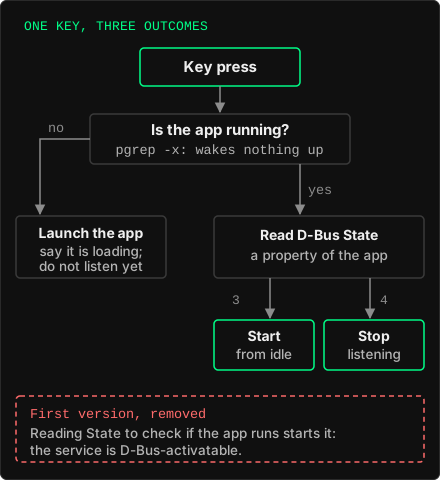
Speech Note's own hotkeys treat start and stop as separate actions. For one key that does both, a small script reads the app's D-Bus State property (on this version, 3 is idle and 4 is listening), sends start or stop accordingly, and sits behind a KDE global shortcut.
Its first version checked whether the app was running by reading that same property. But reading a property of a D-Bus-activatable service starts the service, so "not running" never happened, and the listen command went to an app still loading its model. The repair caused the next problem: the cold-start branch waited for the app and then started listening, sometimes long after the key press, and typed into whatever window was active by then. Now a cold start only launches the app and says so, and the next press starts listening. The running check uses pgrep -x, which wakes nothing up.
6. "Text to active window" was grey because of a socket type
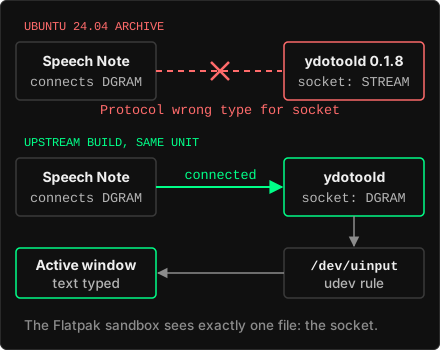
Typing into the focused window on Wayland goes through ydotool, a daemon that writes to /dev/uinput. It took a udev rule for /dev/uinput, a user systemd unit (the packages ship none), and a Flatpak override exposing exactly one file to the sandbox, the daemon's socket. The option stayed grey anyway.
The log said why: Protocol wrong type for socket. The ydotool in the Ubuntu 24.04 archive (0.1.8) creates a stream socket, and Speech Note connects with a datagram socket. Before building anything, we checked the upstream source: its daemon opens SOCK_DGRAM. A user-level build from upstream, swapped into the same unit, connected on the first try, and the socket errors in the app's log went from three per start to none.
7. Whisper's 30-second window, and the GPU add-on
Whisper models are built around 30-second audio windows, and a short utterance is padded to fill one. We did not measure how latency scales with the length of what you say, so we will not put a number on that. What we did measure: on this machine's CPU, the PyTorch Whisper command line took 9.4 seconds with the small model and 18.1 with the medium one for a 6.9-second clip.
Speech Note's whispercpp_use_gpu was already switched on, but without the separate AMD add-on Flatpak it had nothing to use. With the add-on installed, the app logged the Vulkan backend on the 780M, and three clips of roughly 6.5 to 7 seconds took 9.0 seconds (the first, warming up), then 5.0 and 3.9. Different engine, different backend: these are two set-ups side by side, not a benchmark.
One more cost sits at the start: the model loads at the first listen after launch, about two seconds from the disk cache, and words spoken in that gap can be lost.
What it took
None of the seven was in the speech recognition itself. Each sat in a layer around it, and each time the deciding step was to read the real thing rather than the status shown: the recorded signal instead of the mixer, the log line instead of the greyed-out option, the upstream source instead of the version number. Within a week of the first silent attempt, the key was in daily use.